The Best Fluffy Pancakes recipe you will fall in love with. Full of tips and tricks to help you make the best pancakes.


To streamline your kitchen workflow, start by mapping every step from receiving to dispatch. Then, separate production, assembly, and packing to cut peak-hour congestion.
Automate order intake to kill manual re-entry, and build a one-way layout that cuts movement in half. Set up stations by role, track inventory in real time, and centralize all order channels.
Eliminate role overlap to reduce reactive work. Stick around—there’s even more to uncover.
Map Your Full Process From Receiving to Dispatch, Then Apply the Framework
Before you do anything else, you’ll want to map your full process from receiving to dispatch: the entire trip that ingredients and orders take through your kitchen.
Trace every handoff: receiving, storage, prep, cooking, assembly, packaging, holding, and dispatch.
You’ll spot where manual re-entries or fragmented communication slow your kitchen workflow down. That’s where a Kitchen Display System (KDS) and centralized order management come in. They cut ticket delays and boost order accuracy.
Don’t forget real-time inventory management—it prevents those frantic mid-service shortages that throw your whole rhythm off.
By separating order intake from production and dispatch logistics, you reduce reactive chaos.
This map reveals where task switching creates bottlenecks, so you can fix them before peak hours hit.
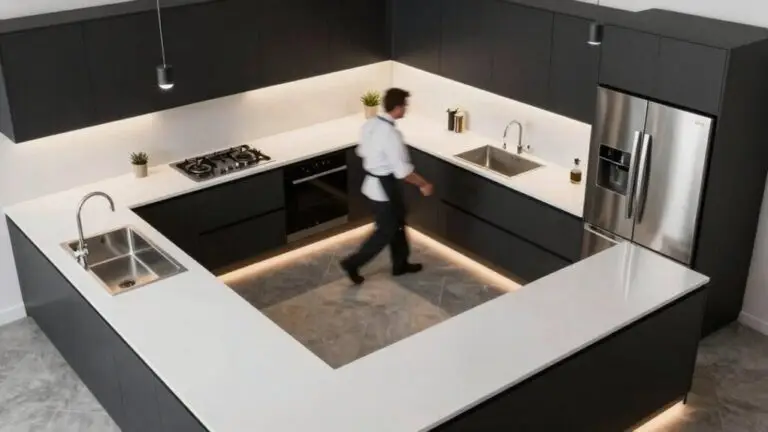
Applying work triangle logic to your physical kitchen layout keeps your sink, stove, and fridge within an efficient range of each other, so movement between key stations doesn’t compound the workflow problems your process map uncovers.
Simple, right?
Separate Production, Assembly, and Packing to Cut Peak-Hour Congestion
You’ll reduce chaos by physically separating your production, assembly, and packing into dedicated zones, so cooks can focus on batch cooking without juggling packaging tasks.
Set up a centralized order routing system that keeps ticket flow outside the kitchen, preventing reactive task switching from breaking your cooking sequence.
This simple layout and digital handoff mean each station handles only its stage during peak hours, cutting congestion and keeping your team from bumping into each other.
Position undercounter refrigeration within reach of your prep surfaces so cooks aren’t crossing zones to retrieve ingredients during high-volume service.
Separate Production Zones
Since your kitchen’s peak-hour chaos often starts when cooks stop to plate and pack, separating those tasks into distinct production zones keeps everyone moving forward. You’ll transform your kitchen workflow by carving out a dedicated cooking line and a separate packaging spot. This breaks that frantic “stop-and-go” cycle, letting each station focus on its job.
An efficient kitchen uses this clear layout to minimize cross-traffic, so your team isn’t tripping over each other. Stage your kitchen equipment and packing supplies in the right work areas, and you’ll cut those annoying bottlenecks. It’s simple: prep here, cook there, plate over there. Just as home kitchens benefit from a zone-by-zone storage blueprint that positions pots, utensils, and prep tools closest to where they’re actually used, commercial kitchens thrive when each production area is stocked with only what that station needs.
Centralized Order Routing
After you separate your kitchen into distinct production zones, you still need one clear boss for all those incoming orders. That’s where centralized order routing saves the day. Instead of juggling tickets from your POS, phone, and delivery apps during peak hour, let a single order management system be the traffic cop.
It prioritizes tickets before they reach your kitchen, so your team isn’t slammed with chaos.
This keeps your kitchen workflow seamless and cuts bottlenecks. Now, your production workflow runs production and cooking in one dedicated flow, while assembly and packing start only when items are ready—reducing task-switching delays.
Coordinate dispatch separately, so drivers don’t fight cooks for attention.
You’ll minimize reactive rework and boost accuracy. Just as the kitchen work triangle links your refrigerator, sink, and stove to reduce wasted movement, centralized order routing links your production, assembly, and packing zones to eliminate unnecessary steps between stations. That’s how you streamline workflows and conquer peak-hour congestion without losing your cool.
Automate Order Intake and Kill Manual Re-Entry With Connected Systems
You’ll stop the chaos of manual re-entry by automating order intake straight from your POS to the kitchen. With automated routing, each order zips to the right station instantly, so your team isn’t playing a guessing game.
That means fewer bottlenecks and less double work, leaving you free to cook without the hassle of typing everything twice.
Connected Order Intake
Because manual order re-entry is a major source of kitchen chaos, you can kill it entirely by connecting your digital ordering, POS, and Kitchen Display System (KDS) into one seamless flow. This connected order intake automatically organizes and prioritizes incoming orders before they hit your line, reducing chaos during peak hours.
By syncing your ordering systems, you cut inconsistency risk and speed ticket flow—no more squinting at handwritten notes. Production data integrates so orders create kitchen-ready work tickets with correct specs, quantities, and timing. That boosts kitchen efficiency and improves order accuracy.
Plus, tracking inventory tied to connected systems lets the kitchen get alerts if stock’s low before an order finalizes. This workflow optimization transforms messy kitchen operations into smooth sailing, even on the busiest nights. Just as online interior design platforms use photorealistic 3D renderings to eliminate guesswork before a single purchase is made, connected kitchen systems eliminate guesswork by giving your team accurate, real-time order data before a single dish is prepared.
Automated Order Routing
Kill manual re-entry for good by using a centralized order management system that captures orders from every channel—online, phone, or in-person—and automatically routes them to the right kitchen station based on the menu item.
Automated order routing turns chaos into a streamlined workflow, sending burgers to the grill and salads to the cold station without confusion.
Your order management system integrates with POS and digital ordering, so orders flow directly to the KDS—no more typing errors or lost tickets.
You’ll get real-time order status (sent → in production → ready), cutting down on those frantic phone calls about “where’s my order?”
Connect dispatch separately from kitchen production, so driver assignments don’t mess up plating timing.
Just as a well-designed kitchen maps storage by function—assigning pull-outs for towels and utensils near the range—your routing logic should assign order types by station so every item lands exactly where it belongs without guesswork.
The result? More accurate orders, faster delivery, and a happier team during peak hours.
Build a Single-Flow Layout That Cuts Kitchen Movement by Half
If you’ve ever watched a busy kitchen turn into a chaotic dance of near misses, you know that cutting movement by half starts with a smarter layout. By adopting a single-flow (linear) production design, you’ll transform your kitchen into a smooth, one-way street.
Here’s how to build it:
- Arrange work surfaces in strict order: production zones (prep→cook→plate/package) so your crew moves forward, not back and forth.
- Place prep stations directly upstream of cooking stations, then hold finished items downstream—no more crossing behind cooks with hot pans.
Position reachable arms-reach zones at each station, hiding rarely-used tools to reduce travel time for every step in your workflow.
In a U-shaped design, place the fridge and cooktop at opposite ends with the sink centered between them to anchor your prep zone and reinforce forward movement naturally.
STOP TASK-SWITCHING CHAOS DURING RUSHES; EACH ZONE KEEPS ITS OWN TOOLS AND STAFF SPECIALIZED, CUTTING CONGESTION INSTANTLY.
Watch your ticket-to-ready time shrink as movement drops by half. A linear flow keeps orders predictable even at peak volume.
Set Up Prep Stations by Role for Faster, Smoother Execution
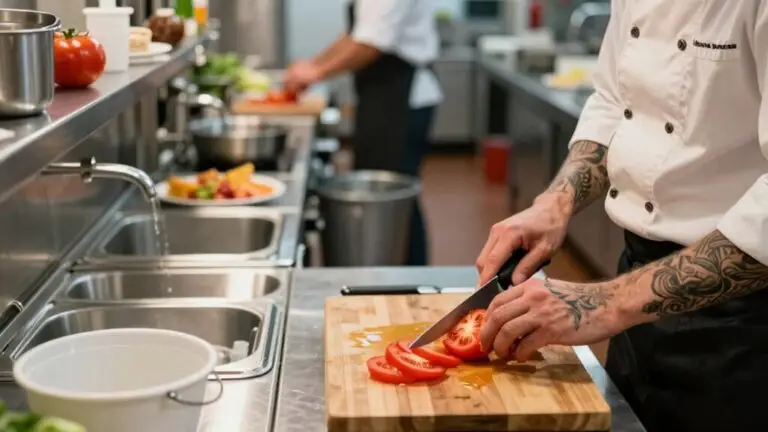
Once you’ve got that one-way flow in place, it’s time to think about the people working those stations. Assign clear roles: cold-prep, hot-prep, garnish, so each person stays focused and doesn’t switch tasks mid-rush.
Build each prep station around a single workflow step, keeping tools and ingredients within arm’s reach. That cuts unnecessary movement and keeps output consistent.
Build each prep station around a single workflow step, keeping tools and ingredients within arm’s reach.
Set up zone-based areas to prevent congestion. Keep raw prep separate from plating.
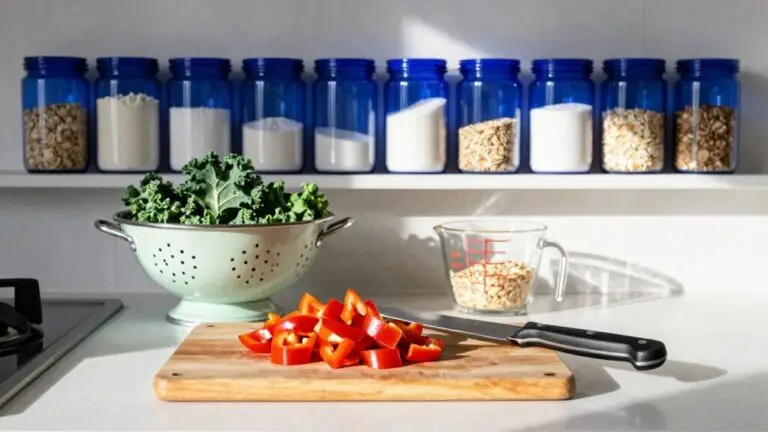
Use mise en place: pre-measured ingredients and labeled containers, so starters execute fast without interruptions.
Organize your storage solutions with drawer dividers and magnetic strips to keep frequently used items visible and accessible.
Color-code your prep zones so that red, green, blue, and yellow areas each have their own dedicated boards, bowls, and utensils to prevent cross-contamination between raw meat, produce, fish, and ready-to-eat items.
This makes your workflow more efficient, keeps counters clean, and lets you fly through service without tripping over your own feet.
Use Digital Recipe Standards to Lock in Cook Times and Quality

- Use gram weights and batch yields to kill variation across shifts.
- Build cook-time rules into your SOPs so the same dish hits perfect doneness every time.
- Store golden recipes with costing data to track deviations and waste.
- Standardize critical variables, like oven calibration and marinade times, for staff-proof execution.
- Update standards only after measured performance checks to continuously tighten quality, not regress mid-service.
- Pre-measure spices, liquids, and dry ingredients into labeled containers before service begins, since missing pre-measured ingredients can slow mid-recipe transitions by 20–40% and disrupt kitchen momentum.
Track Inventory in Real Time to Prevent Shortages and Cut Waste
You can stop running out of key ingredients mid-shift by tracking inventory in real time across sales, purchases, and production entries. Automated low-stock alerts will trigger replenishment before you hit a crisis, especially during peak hours when every second counts. Using clear, modular bins with labels in your pantry storage areas also helps you spot low-stock items early and identify duplicates before they cause gaps in your supply.
Real-Time Stock Monitoring
Because stock shortages always seem to hit right in the middle of a dinner rush, real-time inventory monitoring is a total game-changer for your kitchen. This unified system connects your sales, prep, and storage, so stock levels update automatically—no more guessing.
You can track inventory accurately, spot waste fast, and keep your workflow steady and consistent. It’s like having a sixth sense for what you’ve got on hand.
Automatically sync stock from every sale and prep entry, so shortages vanish during peak hours.
Catch waste and variance by comparing usage with recipe data, which cuts spoilage and boosts profit. Low-stock alerts trigger replenishment before you run out, avoiding last-minute substitutions.
Recipe management ties standard portions to usage, so over-portioning becomes a thing of the past. Kitchen teams see live availability instantly, cutting missed prep items and order errors.
Automated Reorder Triggers
Once your real-time stock monitoring is humming along, the next smart move is setting up automated reorder triggers: think of them as your kitchen’s early warning system. They connect your inventory tracking directly to sales and production, so every POS sale or prep batch instantly reduces stock. No more mid-service surprises.
The real genius is recipe or BOM usage. Your system knows chicken broth feeds multiple dishes, so it orders exactly what you need—not generic restocks. Set alert thresholds based on supplier lead times, triggering purchases earlier during peak hours. That means fewer emergency substitutions cluttering your commercial kitchen.
It’s like having a sous chef who never forgets to restock. These triggers prevent shortages without over-ordering, keeping your workflow seamless and your team smiling.
Waste Reduction Tracking
Even though real-time stock monitoring keeps you from running out mid-service, waste reduction tracking takes it a step further: it helps you slash what you throw away.
This isn’t just about counting; it’s about spotting waste before it becomes a habit.
By linking recipes to exact quantities, you reduce waste and cut down on unnecessary movement during food preparation.
You’ll catch over-preparation before it fills your trash bin.
Real-time monitoring alerts you before shortages force costly substitutions.
Recipe management ties each dish to precise amounts, cutting human counting errors.
Waste visibility compares expected vs. actual usage, revealing repeat waste drivers.
Automatic reorder triggers keep replenishment aligned with demand, eliminating panic buys.
Ingredient costing quantifies how waste hits your margins, guiding smarter process fixes.
FOCUS ON EFFICIENCY, AND YOU’LL STOP TOSSING CASH IN THE DUMPSTER. IT’S THAT SIMPLE.
Automate Dispatch Routing to Coordinate Drivers and Delivery Windows
Automating dispatch routing takes the chaos out of coordinating drivers and delivery windows; you’re essentially handing the brainwork over to a system that sees the big picture.
By integrating order management and routing, you prioritize orders before they hit the kitchen. This prevents those frantic mid-shift interruptions.
The system uses live tracking and status updates to match pickups with traffic. You’re not constantly rejiggering plans.
Those estimated delivery windows become reliable promises, not wild guesses.
With dispatch rules that batch stops and optimize routes, your drivers spend less time idling and more time actually delivering—a win for everyone.
Plus, digital logs time-stamp every stage (assigned, picked up, en route, delivered), helping you pinpoint delays and fine-tune your next delivery window.
It’s like having a traffic manager with a crystal ball, minus the headache.
Centralize All Order Channels Into One Dashboard to Stop Confusion

Now that you’ve got dispatch routing dialed in, it’s time to tackle the next big culprit of kitchen chaos: order confusion.
Centralizing all your order channels into one dashboard is like giving your team a single, clear voice. You’ll stop the scramble between tablets, phones, and screens. You’ll create a steady flow from order to plate.
Here’s how a unified dashboard transforms your kitchen:
- Design a single hub that grabs orders from every channel—online, POS, delivery apps, phone—so you’ve got one consistent ticket stream.
- Automatically route orders by prep time or complexity to maintain consistency, cutting out that annoying “stop-and-fix” mode.
- Sync the dashboard with your Kitchen Display System to ban paper chases and keep production moving digitally.
- Maintain full visibility on every modification and queue status, so no one’s guessing what’s next.
- Use real-time data to adjust staff and station zoning during rushes, avoiding those late-in-service panics.
This isn’t just tech, it’s your ticket to calm, controlled service.
Eliminate Overlap Between Kitchen Roles to Reduce Reactive Work
Once you’ve got a single dashboard taming incoming orders, the next bottleneck usually shows up in how your team moves. To eliminate overlap between kitchen roles, you’ve got to separate workflows by function. Don’t let your cook answer ticket changes while they’re mid-flip; that’s a recipe for chaos.
Instead, handle order intake independently from preparation. Set up production zones: prep, cook, assembly, packaging. Each zone focuses on one stage, so nobody’s running back and forth for ingredients or juggling dispatch logistics.
This kitchen design cuts unnecessary steps and lets everyone work efficiently. You’ll see fewer last-minute corrections and more predictable ticket times. It’s like giving each role its own lane; no bumping, no burnout, just seamless flow.
Final Thoughts
So, you’ve got the tools to turn your kitchen chaos into a calm, well-oiled machine. Start small: pick one step, like setting up prep stations, and see the difference. You’ll save time, cut stress, and maybe even laugh at how simple it feels.
Remember, a less bumpy workflow doesn’t just boost profits; it gives you back your sanity. Ready to roll? Your streamlined kitchen’s waiting.